
Table of Contents
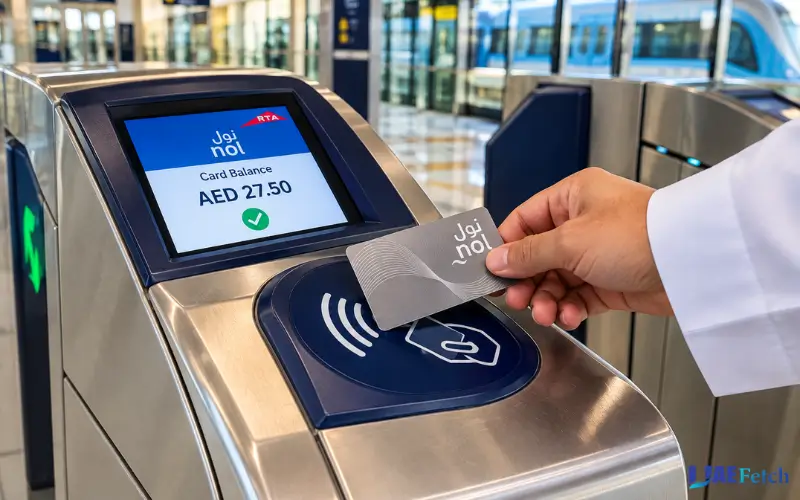
In Dubai, using public transport means it’s crucial to keep an eye on your Nol card before you set out on your journey, especially to prevent any unnecessary delays at bus stops or Metro gates. You can see how much money is on your card, check if there are funds from a recent top-up added to your account, and determine what you may need to do to top up before your next trip.
One can check the Nol card balance in a few different ways on the Roads and Transport Authority (RTA). One can use the official RTA website, the Nol Pay application, or the machines available at Metro stations. There might be a need to wait until your online top-up has been displayed so that you can use the increased funds.
This guide explains how to check your Nol card balance online, identify your Nol tag ID, use your Nol card with your phone, top up the Nol card,d and the common issues if you are having problems with your Nol card balance.
How to Check Nol Card Balance Online
One of the most convenient methods to check your Nol card balance is by going to the official RTA site. The balance-check feature can be used without getting into a Metro station.

Check Nol Balance on the Official RTA Website
Here are the steps to check your balance online:
- Visit the official Roads and Transport Authority website.
- Locate the Check NOL Balance service.
- In this field, type in your NOL tag ID.
- Click on either the check mark or the search button.
- Check the balance information on the screen.
Please be sure to input the proper tag ID, particularly when having multiple Nol cards. Useful online service for checking your balance before you leave the house or go to work.
Where to Find Your Nol Tag ID
The Nol Tag ID is a card identifier that’s given to you. RTA leverages it for services like checking and topping up online. Refer to the card printed on your material. In case you don’t know the tag ID, follow the instructions given in the RTA app or refer to the features of the official Nol Pay app to access card information. Keep in mind that the tag ID is different from the card balance. The tag ID will be your card ID, and the balance will display the amount of money that you have on your card to use for travel and to support various payments.
Can You Check Nol Balance Without Logging In?
There’s a NOL tag ID balance-check feature on the RTA site. Unlike account-based services that enable you to register a card, provide account details, etc., or to top up your account.
Other account services might need a UAE paPassr RTA account. Do what the service tells you to, and never put your credit card information into a site that you are not familiar with.
How to Check Nol Card Balance Using the Nol Pay App
The official Nol Pay app enables users to verify the balance of their Nol card as well as to top up their enabled credit cards. It also provides card-management features and services for applicable Travel Passes.
Steps to Check Your Balance on a Mobile Phone
Follow the following steps in general:
- Follow it up by opening the official NOL Pay App.
- Log in if necessary (using a supported method).
- Tap the appropriate card or click on the card-information option.
- When prompted, scan your physical card on your phone’s NFC reader.
- Do as prompted and read the balances that it shows.
Menu names could vary if the app is updated. Do what is indicated in the App ( depending on the version you are using). When you have a number of Nol cards, choose the proper one. This is crucial before topping up a credit card to the wrong account.
Can You Check Nol Balance Using NFC?
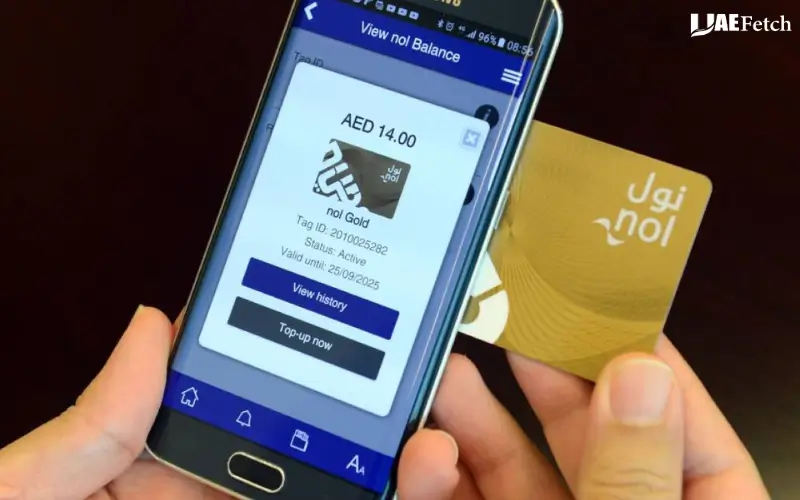
NFC is an acronym that is used to identify Near Field Communication. In this feature, if a card that you are holding is supported and your phone is too, you can read the information from the card when you hold it near the reader.
If your phone and card have the necessary features and capabilities, go to Pay and scan the card. Place the card as close to the NFC reader on the phone as needed until the App finishes.
Check to see if your phone has NFC and if it is turned on; if it doesn’t pass the scan. Also, if you have a thick phone case on, you can take it off and see if you can try again. If the card is still not readable, use the RTA website or a station machine that supports the app.
Checking Nol Balance on iPhone and Android
There’s a bit of variation in the steps that you can take on the iPhone versus Android devices, due to differences in device compatibility and NFC capabilities. Not all Noll Pay functions are available for all phones.
Determine what information is available to the current app and the requirements of the device before depending on NFC. If your phone doesn’t scan the card, you can use another supported method for getting a phone to check the balance.
How to Check Nol Card Balance at a Metro Station
For those who are close to a Dubai Metro station, you can check your travel balance on the vending machine or ask their staff for assistance. This feature helps you when you’re offline or unable to access Nol Card.
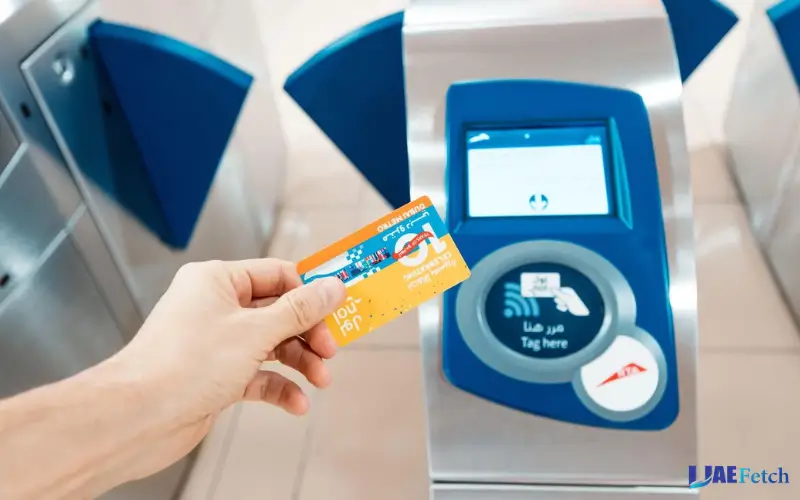
Use a Ticket Vending Machine
Follow these steps:
- Go to any Dubai Metro station equipped with a ticket vending machine. Go to any Dubai Metro station with an ATM for buying tickets.
- If the machine requires inserting the Nol card, do so.
- Search for any options to view card information or check card balance.
- Follow the instructions in the instructions box on the screen.
- Before embarking on your journey, review the information displayed.
Any differences exist between machines. If you don’t see the ‘BALANCE CHECK’ option, please request help from the station staff member.
Check Your Balance Before Entering the Metro
On arrival at the NOL, you check your NOL card balance. If you have a low account balance, top it up using a method available to you, and make sure that the money is credited to the card.
Beware – a payment confirmation isn’t always a trigger for an online top-up! Some top-ups will need to be activated before the topping up is counted to your available money.
How to Top Up a Nol Card and Check the Updated Balance
A balance check displays how much money you have on your Card. It’s topped off by a top-up. Recharge and then check the amount again to ensure the amount is available for use.
Top Up Your Nol Card Through Nol Pay
The nol Pay app supports top-ups for physical and virtual nol cards. The steps depend on the type of card you use.
For a physical card:
- Open nol Pay and sign in using a supported account.
- Select the top-up option.
- Scan your card using NFC or select a supported linked card.
- Choose the amount you want to add.
- Complete the payment.
- If you scanned a physical card, tap it against the phone’s NFC reader again when prompted.
- Check the updated balance.
A physical-card top-up through nol Pay can become available instantly after the required second tap. Supported virtual-card top-ups can become available instantly after payment.
Recharge Your Nol Card Through the RTA Website
Another way to add credits to your card is from the official RTA website. The procedure is basically as follows: sign up, log into the card-management system, opt for top-up, type in your Nol tag ID, pick the amount you intend to pay, a nd pay it.
Please allow for a 45-minute–4-hour wait after payment to use the top-up. Then you can add any pending amount using a method that has been approved, such as paying on the Nol Pay or using a Metro gate.
How Long Does a Nol Card Top-Up Take?
The time depends on the top-up method you choose.
| Top-up method | Waiting time and activation |
| Nol Pay using NFC for a physical card | Instant after the required second tap |
| Supported virtual Nol card | Instant after payment |
| RTA website | Usually 45 minutes to 4 hours, followed by activation |
| RTA Dubai or S’hail using the tag ID | Usually 45 minutes to 4 hours, followed by activation |
| Metro ticket vending machine | Generally available immediately after the transaction |
| Metro ticket office machine | Generally available immediately after the transaction |
These timings can depend on the method and the card you use. Check the instructions for your transaction because top-up and activation requirements may differ.
Why Is My Nol Card Balance Not Updated?
Don’t assume that payments fail just because the balance on the NOL card hasn’t changed after recharge. First, don’t forget to see if the top-up is pending or the need to activate it.
Your NOL Top-Up Is Still Pending
If there’s a pending top-up, it may have been successful, but the funds have not actually reached the card yet.
This is possible if you top up via the RTA website or via another source (needs more activation). Please refer to the receipt that came with your payment and wait for the required time as announced by RTA before attempting to activate the balance.
You Have Not Activated Your Top-Up
Online top-ups may have a post-payment tap and/or scan requirement. Your balance can be activated via Nol Pay, Metro Gate, or another authorized device (depending on the method selected).
RTA prescribed period for pending top-ups – they are to be activated if they were topped up online. Follow instructions for your transaction and activate within the specified time frame.
Payment Succeeded but the Balance Did Not Change
If your payment went through and your payment balance hasn’t changed, you can try the following:
- Please verify the payment receipt/txn Ref.
- Find out if there is any waiting period for the top-up you are using.
- Do the necessary activation step.
- Re-check your balance via nNolPayr at the RTA website.
- If the amount is still missing, follow the instructions above and contact RTA.
Do not enter the same payment again until you have verified the first payment. This can prevent you from getting duplicate top-ups.
Your Nol Card Is Expired or Blocked
A pending top-up might not be activated if the card does not exist or is obstructed. If the card has expired, please refer to the official RTA refund service to determine the options available to your situation.
Any lost, stolen, damaged, faulty, or expired RTA-issued cards may be reported as lost or stolen, and a new card will be issued to replace the lost card. Rules based on the nature of the card and the refund request.
How Much Balance Do You Need on a Nol Card?
It will be different amounts depending on your trip, the applicable fare, and whether you are using a Travel Pass or pay per trip.
Always check your account balance before travelling – particularly if you travel daily by public transport. Check that any increase in the amount is in place if you’ve just recharged online.
Minimum Balance vs. Pending Balance
Money on hand and ready to use is also known as available balance. Your pending balance is the amount that you already paid and still have to activate.
The RTA announces the minimum amounts to activate pending top-ups on the Metro gates. Requirements vary from card to card, so please refer to the latest RTA rules to assume any amount.
If the Metro gate cannot read the card, try reading the message that is displayed or ask staff at the gate for assistance. This issue might be connected with the available balance, an upcoming top,-u,p or the state of the card.
Does Nol Card Type Affect Balance Checking?
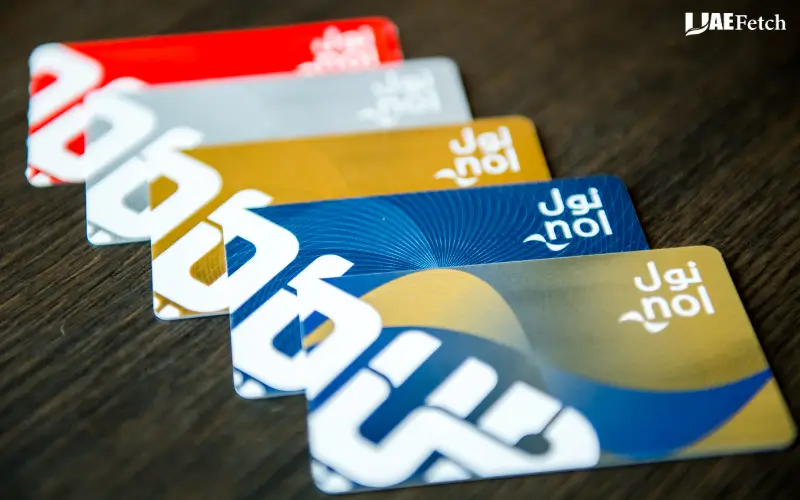
Dubai’s Nol cards come in various kinds for various purposes. The services available may vary depending on whether you are a Silver cardholder, Gold cardholder, a personal Blue cardholder, Red Ticket cardholder, or a virtual Nol cardholder.
Silver, Gold and Personal Blue Nol Cards
Popular forms of cards for public transport include Silver or Gold Nol cards. Personal Blue Nol cards are available for certain groups, providing more services and discounts available by account.
The Silver and Gold cards registered under RTA can be used by the participants of the program, and personal cards can be registered and operated via the RTA’s services. Registered cards can also provide access to additional card-management options.
Red Ticket and Virtual Nol Cards
The Red Ticket is not the same as the reusableSilver, Gold, and Blue cards. Virtual NOL cards come online from supported Devices and the Nol Pay App.
Don’t take it for granted that all cards will have the same balance, top-up, and scanning features. Follow the instructions for your particular card type.
What If You Have More Than One Nol Card?
When you have more than one card, choose the appropriate card before checking your account balance or making a payment. This is especially crucial if you have family cards or made separate ones for a journey.
Verify the card information and tag ID before accepting a top-up. You can save yourself from adding funds to an incorrect card by doing a brief check.
What to Do If You Lose Your Nol Card
If the Nol card has some money or a Travel Pass, that could cause some problems. Options available may vary based on card type and registration.
Can You Recover the Balance of a Lost Nol Card?
The RTA insists on providing a formal service to claim the remaining balance or an unactivated balance on RTA’s lost, stolen, damaged, faulty, nd expired cards. If it is not used, the remaining amount can be either returned or given to another Nol card.
Please check the eligibility criteria before requesting a refund. So don’t expect every card to be eligible for receiving a refund; likewise, whatever money is not collected can’t be collected.
How to Report or Replace a Lost Card
If the card is registered/linked with an RTA account, log in and see the card-management options available. Proceed with the process of reporting, blocking, or replacement of the card per the instructions of the service where allowed to do so.
Have records of your transactions and credit card information on hand when you call RTA. Don’t provide your account password PIN to anyone claiming to recover your account if you forgot it.
Quick Comparison: Nol Card Balance Check Methods
| Checking Method | What You Need | Best For |
| RTA website | Nol tag ID and internet access | Checking your balance online |
| Nol Pay app | Compatible smartphone and supported app features | Checking balance and managing your card |
| NFC card scan | NFC-compatible phone and supported nol card | Reading physical card information |
| Metro ticket vending machine | Physical nol card | Checking balance while at a Metro station |
| Metro ticket office | Physical nol card | Getting help with card services |
| RTA account services | Supported login and registered card, where required | Managing cards and accessing additional services |
Which method should you choose?
- For online checking: Use the RTA website and your nol tag ID.
- For checking on your phone: Use the official nol Pay app.
- At a Metro station: Try a supported ticket vending machine or ask station staff for help.
- If your top-up is missing: Check whether it is pending and needs activation before paying again.
Final Tips for Checking Your Nol Card Balance
You can view your Nol card balance online via the official website of the RTA or using the Nol Pay app. For those who are at a Metro station, a supported ticket machine will come in as another handy choice.
Before leaving for travel, verify the account balance, use your Nol tag ID, and ensure that an online top-up requires activation. In case your payment balance fails to come up even after following appropriate steps, please reach out to RTA or their official refund number rather than making continual payments.
Must Visit: ATM Balance Check in UAE: Steps, Fees, Methods and Common Problems
Frequently Asked Questions
Where is the website to find the balance of the nol card?
Visit the official RTA website and use their Check nol Balance service. Enter your nol tag ID and follow the instructions to display your balance. You may make use of the official nol Pay application too.
What is the ideal way to determine my nol balance on my mobile?
Open up the nol Pay application and touch its card-information directions. To scan a physical card, a cell phone must have the capability to utilize the NFC function and must be compatible with the app.
Is there any way to get the nol balance from the Tag ID?
Yes. The RTA website offers a balance check service you can do online using your nol tag ID. Fill out the appropriate code and read the instructions on the official website.
What is the time duration of NoL topping up online?
This is dependent on the method. NoL Pay is a physically uploaded wallet where a second tap is required and is instant after that. The add-on for the RTA website will take about 45 minutes to 4 hours and will be activated after the website add-on.
Why is my no card balance not updated after recharge?
Your top-up might still be pending, or you might have to activate it. See the receipt, wait the appropriate amount of time, and follow the requested ACTIVATION INSTRUCTIONS. In case of an unaltered amount, please call RTA.
Is it possible to get my Nol balance at a Dubai Metro station?
Yes. A supported ticket vending machine or station staff are available to assist you. These machines also offer the option for topping up cards.
Is there any method to get the remainder of a lost Nol card?
RTA’s Refund service covers lost, stolen, damaged, faulty, or expired cards. It ultimately depends on the type of your card and the refund policies that are in place.


2 comments
[…] Must Visit: Nol Card Balance Check: Online, App and Metro Methods […]
[…] Must Visit: Nol Card Balance Check: Online, App and Metro Methods […]