

Table of Contents
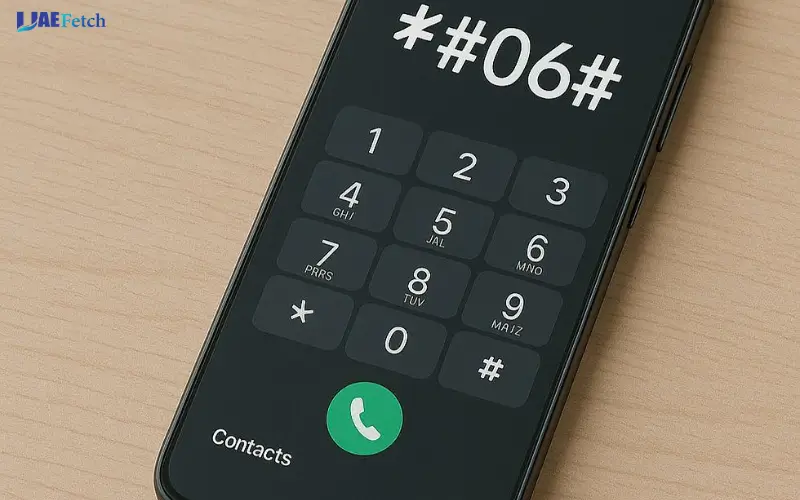
Whether you have an iPhone or an Android device, it will be easy to check your cell phone’s IMEI number in the UAE. You’ll require this number before you purchase used mobile phones, report a lost phone or check a mobile’s identity. An easy way to do this is to go into your phone’s dialer and call *#06#. The IMEI number should be on the phone’s display. It is also available in your phone settings or on its manufacturer’s box.
What Is an IMEI Number?
IMEI is the International Mobile Equipment Identity. It is a special number that is used to identify a cell phone. Cellular phones that connect to cell phone networks will have an IMEI number. Consider it to be a phone number identifier. It will assist mobile operators in finding a phone if customer reports a problem or it is lost. The IMEI number typically consists of 15 digits. It’s different from your mobile number, which is used to call and message you.
Why Does Your Phone Have an IMEI Number?
Your phone’s IMEI number helps mobile operators identify the device connected to their networks. It can be useful when you need technical support or report a lost or stolen phone.
Here are some common reasons to check it:

- To identify your phone before buying or selling it.
- To report a lost or stolen device.
- To ask your mobile operator about a blocked phone.
- To compare the device details with its original packaging.
- To provide device information when requesting support.
Keep in mind that an IMEI number does not prove that a phone is genuine or free from problems. You may need additional checks before buying a used device.
IMEI Number vs Serial Number vs Phone Number
These three numbers serve different purposes.
| Number | What it identifies |
| IMEI number | A mobile device that connects to a cellular network |
| Serial number | A device identified by its manufacturer |
| Phone number | A mobile line used for calls and messages |
A phone can have an IMEI number even if you have removed its SIM card. Your phone number, however, belongs to your mobile service and may change when you switch SIM cards.
How to Check IMEI Number UAE Using a Dial Code
The easiest way to check your IMEI number in the UAE is to use the universal dial code *#06#. This method works on most iPhones and Android phones. You do not usually need an internet connection or an active SIM card to use it.
Steps to Find Your IMEI Number
- Open the Phone app on your mobile.
- Go to the dial pad, where you enter phone numbers.
- Type *#06#.
- Wait for the device information screen to appear.
- Look for the IMEI or IMEI1 and IMEI2 numbers.
Write down the number if you need it for a support request. Keep it private and share it only with a trusted service provider or another party that has a valid reason to request it.
What If the Code Does Not Work?
If nothing appears after entering the code, try opening your phone settings instead. Some devices may handle the code differently. Check that you entered the correct symbols and did not add any spaces. If the code still does not work, restart the phone and try again. You can also look at the original box or use the device-specific instructions below.
How to Find IMEI on an iPhone
Apple provides several ways to find the IMEI number on an iPhone. The Settings app is usually the easiest option.
Check IMEI Through iPhone Settings
Follow these steps:
- Open Settings on your iPhone.
- Tap General.
- Select About.
- Scroll down until you see the IMEI number.
If your iPhone supports two mobile lines, you may see more than one IMEI number. Make sure you record the correct one if a service provider asks for a specific device identifier.
Find IMEI on the Original Box
If you still have the original iPhone box, check its barcode label. The label may show the IMEI number along with other device details. Compare this number with the one shown in Settings. If the numbers do not match, ask the seller or Apple Support to help you understand why before buying or selling the phone.
Check IMEI Through Your Apple Account
You may be able to find the IMEI without using the iPhone itself. Sign in to your Apple Account and open the Devices section. Select your iPhone to view the available device information.
This option can help if your phone is missing or you cannot open its Settings app. Only sign in through Apple’s official website, and never share your account password with a seller or stranger.
Find IMEI on Older iPhone Models
Some older iPhones have the IMEI printed on the SIM tray or engraved on the back of the device. The exact position depends on the model.
Newer models may not have an engraved IMEI. If you cannot find it on the outside, use Settings, the original box, or your Apple Account.
How to Find IMEI on Android Phones
Android phones from different brands may use slightly different menus. However, most Android users can find the IMEI number in the phone settings or by entering *#06#.
Check IMEI in Android Settings
Use these steps on most Android phones:
- Open Settings.
- Scroll down and tap About Phone.
- Look for IMEI, IMEI information, or status.
- Open the relevant section to see your device’s IMEI number.
If you cannot find the option, use the search bar inside Settings and type “IMEI”. Your phone may display the correct menu immediately.

Find IMEI on Samsung Phones
Samsung users can usually find their IMEI number through the following steps:
- Open Settings.
- Tap About phone.
- Look for the IMEI number on the screen.
You can also enter *#06# in the Phone app. If your Samsung phone supports two SIM cards, check both IMEI entries.
Find IMEI on Xiaomi and Redmi Phones
On Xiaomi and Redmi phones, open Settings and select About phone. Depending on the model and software version, you may need to open Detailed info and specs or Status to find the IMEI. If the menu looks different, search for “IMEI” in Settings. The dial code is another simple option.
Check IMEI on Google Pixel Devices
Open Settings and tap About phone. Look for the IMEI information in the device details. If you cannot access your Pixel phone, use Google’s Find My Device service and sign in with the Google Account linked to the device. Select your device and open its settings to view the available information.
Quick Ways to Check IMEI Number UAE
| Method | Steps | Internet Required |
| Dial code | Dial *#06# | No |
| iPhone settings | Settings → General → About | No |
| Android settings | Settings → About phone | No |
| Original phone box | Check the barcode label. | No |
| Apple Account | Select your iPhone under Devices. | Yes |
How to Check IMEI Status in the UAE
Finding an IMEI number and checking its status are two different tasks. The first tells you the device’s identification number. The second involves checking whether the device has a problem that may affect its use. In the UAE, the right method depends on whether you want to check a lost phone, a blocked device, or a phone you plan to buy.
Check Whether a Phone Is Reported Lost or Stolen
If you are buying a used phone, you may want to know whether it has been reported lost or stolen. Start by asking the seller for proof of purchase and checking the phone’s condition. You can also contact a UAE mobile operator, such as e& or du, to ask about the device’s status and any network restrictions.
There is no guarantee that a free website will have complete or current information about every device. A clean result from an unofficial website should not be treated as proof that a phone has never been reported stolen. If you have bought a phone that cannot connect to a mobile network, contact your operator and ask whether the IMEI is blocked.
Check Mobile Device Approval in the UAE
The Telecommunications and Digital Government Regulatory Authority (TDRA) oversees the telecommunications sector in the UAE. Its equipment approval process concerns whether telecommunications equipment meets the requirements for the UAE market. This is different from checking whether an individual phone has been reported lost or stolen.
If you are unsure about a device’s approval status, visit the official TDRA website and look for the relevant equipment or consumer service information. Remember that device approval alone does not prove that a particular phone is genuine, unlocked, or free from a blacklist.
Contact e& or du for IMEI Assistance
If you use a UAE mobile connection, your operator may be able to help with an IMEI-related problem. Contact e& or du through its official website, app, customer service, or service centre. Explain what is happening and ask whether the issue relates to the device, SIM card, account, or network.
You may need to provide the IMEI number, proof of ownership, and identification to complete a request. The exact requirements depend on the issue. If your phone was lost or stolen, report it promptly. Contact your telecom service provider and ask about the official process for blocking the device.
How to Check If an IMEI Number Is Original
An IMEI number can help you identify a device, but it cannot prove by itself that the phone is genuine. A dishonest seller may copy a real IMEI number onto another device. This is why you should check the phone itself and not rely on a number alone.
Compare the IMEI with Phone and Box
Start by checking the IMEI shown in the phone settings or dial code. If the original box is available, compare the number on its label with the number displayed on the phone.
If the numbers do not match, ask the seller for an explanation. There may be a simple reason, such as a box belonging to another phone, but you should resolve the issue before paying.
Check the Phone’s Make and Model
Look at the model name in the phone settings and compare it with the seller’s description. Check the manufacturer’s official website if you need to confirm the device’s features.
Pay attention to the camera layout, storage size, software, screen, and other details. A phone that looks different from the model being advertised needs closer inspection.
Understand Cloned or Duplicated IMEI Numbers
A cloned IMEI is a number copied from one device and used on another. This can make it harder to identify a device correctly and may lead to network problems. You may not be able to detect a cloned number through a basic online check. If you suspect tampering, contact the manufacturer or your mobile operator for advice. Avoid buying a phone if its identifying details appear altered or the seller refuses reasonable checks.
You May Also Like: FAB Balance Check: Best Ways to Check Your Bank Balance
How to Check IMEI Number Before Buying a Used Phone in the UAE
Buying a used phone can save money, but you should check the device before handing over payment. The IMEI number is one part of this process.
Check the Device Before Paying
Use these steps when meeting a seller:
- Dial *#06# and note the IMEI number.
- Compare it with the number on the original box, if available.
- Check the phone’s make and model in Settings.
- Insert your SIM card, with the seller’s permission, and test calls and mobile data.
- Ask for proof of purchase if available.
- Check for signs of damage, repairs, or changes to the device.
These checks can help you avoid some common problems. However, a phone that connects to a network today could still have issues later, so ask the relevant operator about any concerns before buying.

Check iPhone and Android Account Locks
An iPhone may have Activation Lock enabled. If the seller has not removed the device from their Apple Account, you may not be able to set it up properly. For Android phones, check that the seller has removed their Google Account and that the phone can complete its normal setup. Ask the seller to reset the device and let you complete the setup before payment. Do not buy a phone that remains locked to someone else’s account.
What to Check Before Buying a Used Phone in the UAE
| What to Check | How to Check | Why It Matters |
| IMEI number | Dial *#06# | Identifies the mobile device |
| Phone model | Open Settings → About phone | Confirms the displayed model |
| Box and device details | Compare the IMEI numbers | Helps identify a possible mismatch |
| Network connection | Test calls and mobile data with permission | Checks basic network function |
| Account lock | Ask the seller to complete a reset and setup | Helps avoid activation or account-lock problems |
| Proof of purchase | Request a receipt if available | Supports ownership verification |
| Blocked status | Contact the UAE mobile operator | Helps check for network restrictions |
Common IMEI Problems and Solutions
You may face a few problems while checking an IMEI number. Here are simple ways to handle them.
IMEI Number Is Not Showing
Try entering *#06# again. If the number still does not appear, open Settings and look under About phone or About. If neither method works, contact the phone manufacturer or an authorised service centre.
Invalid or Unknown IMEI
An invalid or unknown IMEI message may point to a software, device, or network-related problem. It does not always mean the phone is fake. Avoid trying random repair codes or changing the device identifier yourself. Ask an authorised technician or your mobile operator to check the problem.
Phone Shows Two IMEI Numbers
Some phones support two SIM cards or a physical SIM and an eSIM. These phones may display IMEI1 and IMEI2. This is normal for many dual-SIM devices. If an operator asks for an IMEI, provide the one associated with the affected SIM or connection.
IMEI Is Blocked in the UAE
If your phone cannot connect to a mobile network, contact your operator and ask whether the device’s IMEI has been blocked. If you own the phone, prepare proof of purchase and any details about the problem. If you bought it second-hand, contact the seller and ask them to help resolve the issue. Do not try to change the IMEI to bypass a block. Follow the operator’s official process instead.
IMEI Does Not Match the Box
Check the number again to make sure you have not confused digits. If the numbers still differ, ask the seller to explain the mismatch. If you have not bought the phone yet, wait until you can verify its identity. If you already own it, contact the manufacturer or an authorised service centre.
Is It Safe to Share Your IMEI Number?
Your IMEI number is not the same as a password, but you should still handle it carefully. You may need to share it with a mobile operator, manufacturer, or authorised repair centre when requesting support. Avoid posting it publicly or sending it to unknown people without a clear reason.
Never share your Apple Account password, Google password, banking details, or one-time security codes with someone who asks for your IMEI. If you lose your phone, use the official device-tracking service where available, secure your accounts, and contact your mobile operator. An IMEI number alone cannot locate a phone for you.
Final Thoughts
It’s simple to check IMEI number in UAE. It’s easy to see where to find it by dialling *#06#, or you can check your phone settings if you have not found it with the code. When purchasing used phones, do not put your trust in the IMEI. Look at the device information, test the network connection and ensure it is not bound to another user’s account. If the phone is lost, stolen or inaccessible via SMS, try to reach your mobile operator via its official channels.
Recommended for You:
Nol Card Balance Check: Online, App and Metro Methods
Frequently Asked Questions
How do I check my IMEI number in the UAE?
Open the Phone app and dial *#06#. Your IMEI number should appear on the screen. You can also find it under About phone on Android or Settings, General, and About on an iPhone.
Can I check my IMEI number online for free?
Yes, you can use online tools to look up certain device details. However, the information available depends on the service. An online result may not confirm whether a phone is stolen, blocked, genuine, or approved for use in the UAE.
How can I check if my phone is blacklisted in the UAE?
Contact your UAE mobile operator and ask whether the device’s IMEI is blocked. Provide the number and proof of ownership if requested. A third-party website may not have complete or up-to-date records.
Can I check an IMEI number without a SIM card?
Yes. On most phones, you can dial *#06# without an active SIM card. You can also check the phone settings or its original packaging.
Does every phone have a unique IMEI number?
Most cellular phones have an IMEI assigned to the device. Phones with two cellular connections may have two IMEI numbers. Some devices that do not connect to cellular networks do not have an IMEI.
Can I check whether a phone is original using its IMEI?
An IMEI lookup may help identify a device, but it cannot prove that the phone is genuine. Compare the device details, check its software and hardware, and use the manufacturer’s official support channels if you have concerns.
How do I check my iPhone IMEI number?
Open Settings, tap General, and select About. Scroll down to find the IMEI. You may also find it on the original box or through your Apple Account.
How do I check my Samsung IMEI number?
Open Settings, select About phone, and look for the IMEI. Alternatively, dial *#06# in the Phone app.
Can a UAE mobile operator block a phone using its IMEI?
Yes. Under the UAE’s applicable procedures, operators can block reported lost or stolen devices. Contact your operator to report a missing phone or ask about a blocked device.
What should I do if my phone’s IMEI is invalid?
Check the number through your phone settings and compare it with the original packaging. If the problem continues, contact the manufacturer, an authorised repair centre, or your mobile operator. Avoid unofficial services that promise to change or repair an IMEI without proper authorisation.


1 comment
[…] Check IMEI Number UAE | Easy Steps to Verify Your Phone […]