
Table of Contents
You can get your First Abu Dhabi Bank (FAB) balance by using the FAB Mobile app, Internet banking or an ATM. If you own a Ratibi salary card, then FAB has an added balance enquiry service. The preferred approach will depend on whether you possess a standard lender account, lender card, or perhaps a salary card.
Each method will be illustrated, accompanied by an explanation of what is required to gain access to your balance and common solutions to problems that may arise.
What Is FAB Balance Check?
A FAB type imbalance check displays the total amount of money you have in your bank account or card. This can be helpful for monitoring expenses and verifying payroll and budgeting future costs.
First Abu Dhabi Bank (FAB) in the United Arab Emirates (UAE) provides current accounts, savings accounts, debit cards, credit cards,and prepaid cards. The methods of showing the balance can differ from product to product.

The balance of your available funds may vary from your account balance. Certain payments, such as pending payments, holds, and other payments may impact the amount allowed to be spent.
Best Methods to Check FAB Balance
You can get a hold of your balance in several ways using FAB. Customers favouring online access will be able to use the mobile app or Internet Banking, and if that’s not possible, the ATM should come into their lives.
1. Check FAB Balance Through the Mobile App

The FAB Mobile app lets you check your account balance, review recent transactions, and manage eligible accounts and cards from your smartphone.
Follow these steps:
- Download the official FAB Mobile app from the Apple App Store or Google Play Store.
- Open the app and sign in with your registered login details.
- Go to the accounts section.
- Select the account you want to check.
- Review your available balance and recent transactions.
If you want to check a linked FAB debit or credit card, open the relevant card or account section. The information available depends on your card and digital banking profile.
Security tip: Download the app from an official app store and keep it updated. Never share your password, card PIN, or one-time password (OTP) with anyone who contacts you.
2. Check FAB Balance Through Online Banking
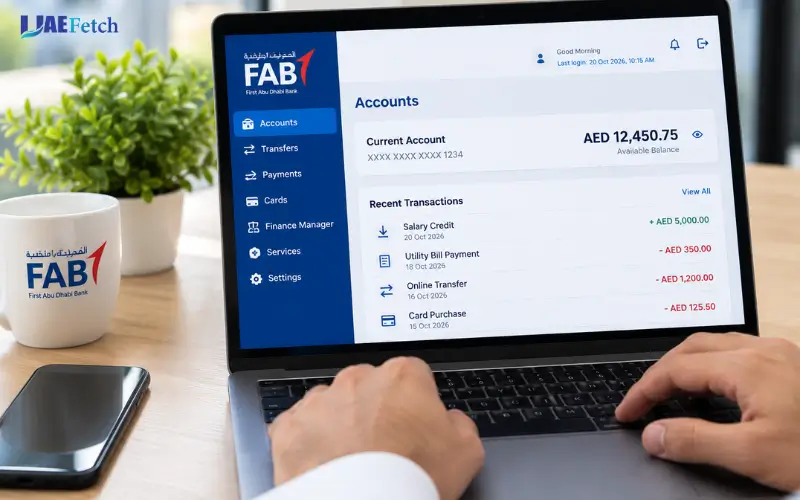
FAB Internet Banking gives you another way to check your account balance without installing a mobile app. You can sign in through a web browser and review your account details.
Here is how to check your balance:
- Visit the official FAB UAE website.
- Find the personal Internet Banking login option.
- Sign in with your registered credentials.
- Open your accounts dashboard.
- Select the account you want to check.
- Review your balance and transaction history.
If you cannot remember your login details, use FAB’s official recovery process. Do not enter your banking information on a website reached through an unknown link or message.
Internet Banking works well if you prefer a larger screen or need to review transactions while managing other banking tasks.
3. Check FAB Balance at an ATM

You can use a FAB ATM to check your balance when you do not have internet access or cannot sign in to digital banking. Other ATMs may also support balance inquiries for eligible cards.
Follow these general steps:
- Visit a FAB ATM or another ATM that supports your card.
- Insert your debit card and enter your PIN.
- Choose the balance inquiry option, if available.
- Follow the instructions on the screen.
- Check the displayed balance and print a receipt if you need one.
ATM menus vary by machine and card type. If you use another bank’s ATM, check for a service fee before confirming the transaction.
Keep your PIN private and take your card and receipt with you when you finish.
Must Visit: ATM Balance Check in UAE: Steps, Fees, Methods and Common Problems
How to Check FAB Ratibi Salary Card Balance

The FAB Ratibi Prepaid Card allows eligible employees to receive their salaries without opening a regular bank account. Because Ratibi is a prepaid salary card, its balance inquiry process may differ from the process for a FAB current or savings account.
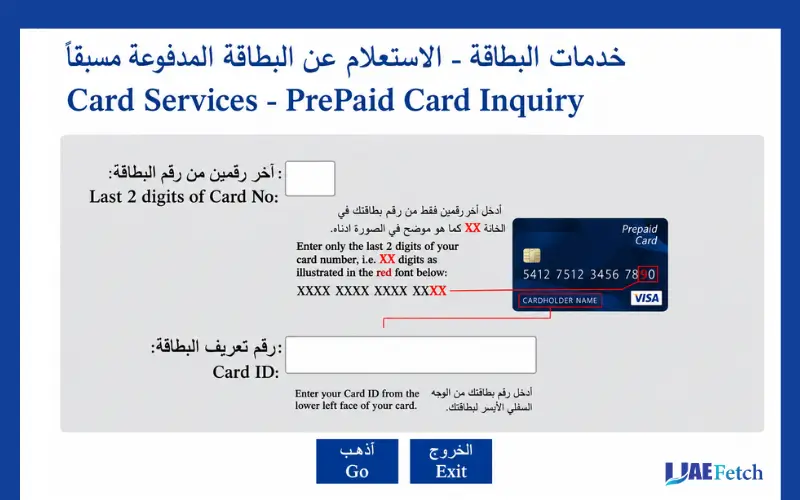
FAB provides a dedicated balance inquiry option for Ratibi cardholders through its official website.
To check your Ratibi balance:
- Visit the official FAB Ratibi page.
- Look for the balance inquiry option for existing cardholders.
- Open the inquiry service linked from the official page.
- Follow the instructions and enter the requested card information.
- Review the balance shown by the service.
Depending on the query system, the information required could be different. Don’t go to an unfamiliar website asking for details of the card, use the official service.
You will see the amount of money on the card in your Ratibi balance. It is different from the balance of a regular FAB bank account. In case the income amount is not shown, please verify the expected pay date with your employer, then contact the bank.
Can You Check FAB Balance Without Logging In?
There are certain FAB cardholders who can view their card balance without logging into normal Internet banking. Depending on the account or the card, the appropriate one is available.
Users of Ratibi cards will have access to a special service to inquire about the balance on the cards’ dedicated website. Other prepaid cards might also have their own inquiry service.
Typically, you need to log into FAB Mobile or Internet Banking to check the balance of a normal current or savings account online. If you have your card and PIN with you, you may use an eligible ATM as an alternative.
Be sure to verify that the service is associated with FAB before filling in any private information. Never use third-party websites that purport to be a free balance check site but have not proved their relationship with the bank.
FAB Balance Check fees
The cost of checking your balance depends on the service, card type, and ATM provider. Check FAB’s current fee schedule and any charges displayed before you confirm a transaction.
| Balance check method | What to check |
| FAB Mobile app | Review the terms for your account and digital banking service |
| FAB Internet Banking | Check FAB’s current service and account fees |
| FAB ATM | Look for any fee displayed on the screen |
| Another bank’s ATM | Check whether the ATM provider charges for a balance inquiry |
| Ratibi salary card | Review the current Ratibi card terms for applicable charges |
Seeing your balance clearly may require determining if the issue is based on your login, the application, your card, or a new repayment.
Common FAB Balance Check Problems and Solutions
If the balance doesn’t appear on the app, please ensure that you have the current version of FAB Mobile and that you have an active internet connection. Close and reopen the app and log in again. If there’s still no balance, reach out to FAB via an official support contact.
- If you are unable to log in: Ensure you have the correct login information, and if you have forgotten your password or username, you can use the official account recovery option. Do not give out your OTP/PIN to persons promising to fix the problem.
- No salary showing on your Ratibi card: Check with your employer to double-check the expected salary payment date. If your employer confirms the payment but your balance does not change, please contact FAB to assist you.
- ATM balance inquiry not working: Ensure that your card is compatible with the ATM and adhere to the instructions shown on its screen. You can use an alternative available ATM or a digital banking service. If an ATM has your card in it, then get in touch with the bank that runs the ATM.
- Transaction unknown – Check your transaction history to see what the payment is. If you do not recognise it, inform FAB immediately via official channels and provide the reports, following their instructions.
Important Things to Know Before Checking Your FAB Balance
Selecting the right inquiry procedure might save you time and also prevent paying unnecessary fees or experiencing login issues. Be sure to verify the service of your account or card before providing it with your information.
- Regular bank accounts: Log in to FAB Mobile and Internet Banking to see transactions and balance.
- Tap on the “inquiry about the amount” service from the official FAB Ratibi page and get the Ratibi salary cards.
- ATM queries: Check for any fee information that may appear before confirming a transaction, particularly if using any ATM other than your own bank.
- If you are experiencing issues logging in, do so in the official way provided by FAB; do not share account information with a third party.
- The terms and services: See the most up-to-date pricing and offerings since fees and services may vary.
These checks are particularly useful when accessing FAB’s digital services for the first time, and when it is time to conduct a salary card check instead of a normal bank account check.
Tips for Getting the Most Accurate FAB Balance
Reading the balance is merely the initial step in (bank) money management. It is important to look at your transactions and confirm payments, as you may find that there are reasons why your available funds may be more or less than expected.
- Monitor pending transactions: If transactions in the queue are such as (card) payments, this can impact how much money is available to spend. If the balance is not as expected, see if some activity has taken place recently.
- Confirm salary payments: If your Ratibi balance doesn’t change on payday, please contact your employer to confirm before contacting FAB.
- Verify unfamiliar payment: If the payment is unfamiliar check details and report in FAB’s official communication channels.
- Enjoy safe banking: Only bank with official FAB and don’t ever enter your PIN, password, or OTP. A bank’s official website is the best place to go for assistance.
- Track payments: If you need to see past payments or review transaction history, download an account statement via a digital banking service or view your history.
These will help you notice whether you’ve been paid late and provide tools to help you understand your balance fluctuations and keep better track of how you spend.
Which FAB Balance Check Method Should You Use?
If you are looking to view your standard bank account from your cell phone, select FAB Mobile. If you feel that a web browser is the best alternative, use Internet Banking, or go to a qualified ATM if you don’t think that you can handle it online. Use the inquiry service on the Ratibi salary card.
The most up-to-date information and costs are available on FAB’s official website, www.fab.org. This will assist you to choose the proper service for your account or card and not make use of outdated information.
You Also Like: Nol Card Balance Check: Online, App and Metro Methods
FAQ’s
Why Is My FAB Account Balance Not Updating?
It can take some time for your FAB balance to update due to pending transactions, payment delays, or app problems. Refresh the app, see your most recent transactions, and check with FAB if the balance is still off.
2. How Can I Check My FAB Balance If the Mobile App Is Not Working?
Access your FAB Internet Banking from a web browser and/or a qualified ATM. If neither of these is available then contact FAB via the official support members.
3. Why Is My FAB Balance Lower Than My Expected Amount?
This is because you may have pending card payments, account holds, fees, or recent transactions, which could have reduced your available balance. Look at your transaction history to see what’s different.
4. What Should I Do If My FAB Balance Check Shows an Incorrect Amount?
Review your most recent transaction and see if any payments are pending or if you see deductions you don’t recognize. If it still does not show up correctly, ask FAB about a problem and give them the pertinent transaction information via an official channel.
5. How Can I Check My FAB Balance After Receiving My Salary?
Log in to FAB Mobile or Internet Banking and check your account balance and statements. The balance inquiry is a service provided by the official FAB Ratibi page for their salary cardholders.
6. Why Has My Salary Not Appeared on My FAB Ratibi Card?
Your employer might not have transferred your salary, or it may be in the process of being done. Make sure to check with the employer before contacting FAB and let them know if the salary was sent and hasn’t yet shown up.
7. Can I Check My FAB Balance With My Account Number Only?
Normally, an account number is not used to gain access to the account balance. Access your account via FAB Mobile, Internet Banking, or use a suitable ATM with authentication.
8. What Should I Do If I Forget My FAB Internet Banking Password?
Go to FAB’s official site and take advantage of the Password Recovery feature. Do not reveal a password, PIN or one-time password (OTP) to someone else, and follow the verification requirements.
9. Why Is My FAB Debit Card Balance Different From My Account Balance?
A debit card is typically connected to a bank account, and pending card transactions and (pending) account holds can impact how much money is available for use. Look at the linked account and recent transactions to determine the difference.
10. Can I Check My FAB Balance From Another Bank’s ATM?
If you have a card that works with another bank’s ATM and you have one available, you can check your balance with another bank’s ATM. There may be an ATM operator’s charge, and you should review any fee that is displayed before confirming the inquiry.
11. What Should I Do If a FAB ATM Does Not Show My Balance?
Look at the instructions on the screen of the ATM and ensure that the card has been inserted into the machine properly. Use an alternate acceptable ATM or utilize digital banking. If it persists, get in touch with the bank that operates the ATM or the FAB, as appropriate to the problem.
12. How Can I Check My FAB Balance Without Internet Access?
If you have your card and PIN, you may test a FAB ATM or an eligible ATM. Internet-checked balances will need an Internet connection for online balance checking via the app or Internet Banking.
13. Why Is My FAB Ratibi Balance Check Not Working?
The inquiry service might be suspended for some time, or the entered information may not be compatible with the requirements of the card. Go to the official FAB Ratibi webpage and validate your entry, and repeat step 2 as needed.
14. What Should I Do If I Notice an Unknown Transaction in My FAB Account?
Check the transactions and get in touch with FAB as soon as possible via an official support channel. In case of suspected fraud, tighten up your account/card and report it to the bank.
15. How Can I Get Proof of My FAB Account Balance?
Look to see if your trading platform, FAB Mobile, or Internet Banking provides an account statement or balance document for your account. For an official balance certification document for visa or loan applications, etc., contact FAB before proceeding, as it may be required; they must confirm whether they can provide a balance certificate and what fee may apply.


2 comments
[…] You May Also Like: FAB Balance Check: Best Ways to Check Your Bank Balance […]
[…] Related blog: FAB Balance Check: Best Ways to Check Your Bank Balance […]